

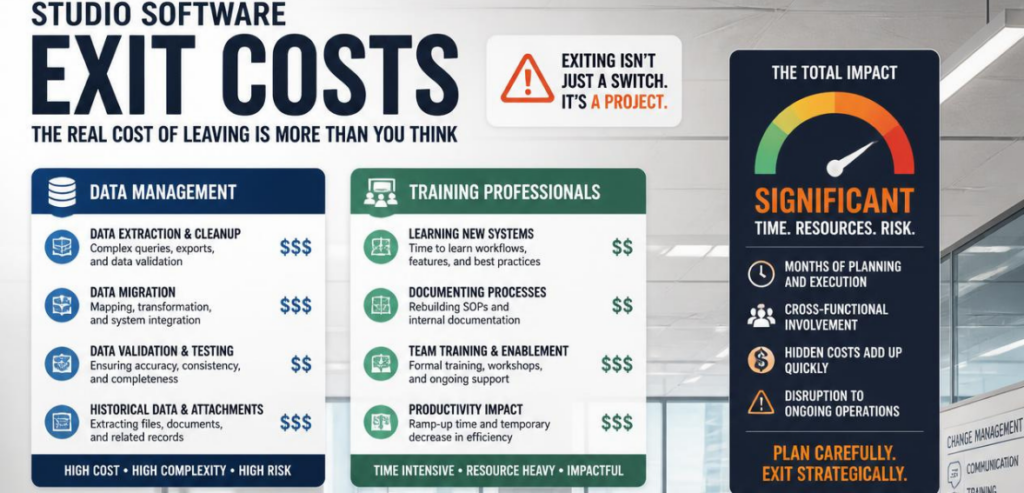
Leaving your studio management platform sounds simple. You cancel, you export, you move on. Then the invoice for reality arrives. Your data comes back as a stripped-down spreadsheet. Your front desk stares at a new dashboard they don’t understand. Your payment processor changes overnight, and a batch of memberships fails to bill. This is the part no sales rep mentions on the demo call.
Software tools build hidden exit costs. The bulk of the costs of these tools show up after you’ve already signed on the dotted line. The sign-up process is used to lure users in, designed to be quick and easy. Exits are designed to create key learning barriers and lock in customers. The cost to exit these tools is one of the best negotiating tools, especially if you own a yoga, Pilates, dance, or other workout studio.
This cost guide looks into the three key areas that cause the most pain when leaving: the cost to access your data, the cost to retrain your existing staff, and the cost associated with processing changes post-exit.
What Are Studio Software Exit Costs?
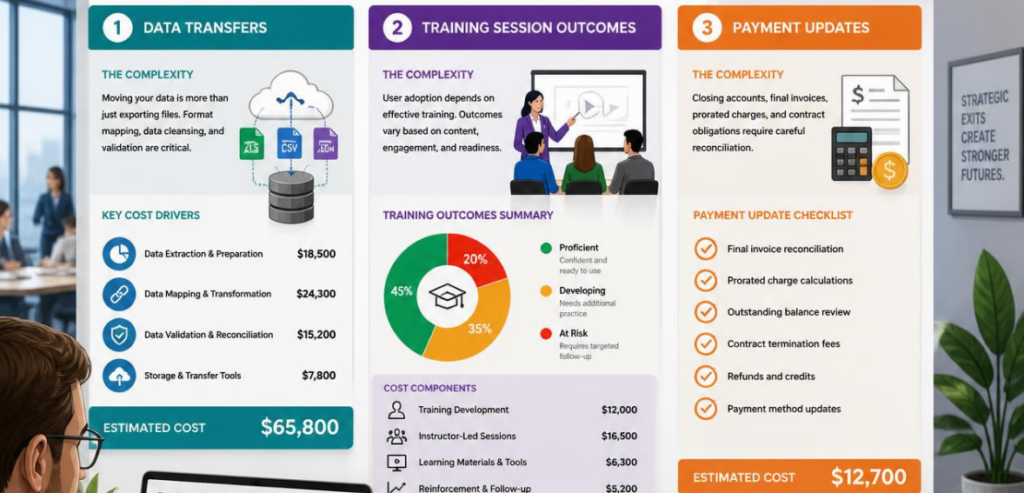
Exit costs are everything you pay to stop using one platform and start using another. The monthly subscription is the smallest piece. The real number includes data migration, staff retraining, lost productivity, cancellation penalties, and the scramble to re-establish payment processing.
Small fitness business owners would be amazed to learn that the typical estimate of the switching cost, including staff time and data migration, can range from $3,000 to $15,000 and would add considerable operational downtime.
You can see where the procurement teams are coming from with the cost of a contract. The initial cost is truly just a reflection. The true cost is what it is to you, including the cost of leaving. The smart practice in most cases is to ask, what is the cost to walk away from the deal?
The Data Problem: Who Really Owns Your Records?
Your member list is the most valuable asset your studio owns. Contact details, billing history, attendance records, membership tiers, session notes, emergency contacts. It’s years of work. And it may not leave as cleanly as you expect.
The bad news is that a lot of the older technologies were built with proprietary storage, meaning that export functionality was usually an afterthought. The bigger and older the technology, the worse the scenario you’ll find when trying to export. Some newer technologies have seen that lock-in is a profitable strategy and build for that intentionally.
There tends to be an easy way for you to check. See if the vendor publishes their API documentation. If they have published documentation, then you have a way to get your data out. However, if the documentation is behind a sales conversation, then you should be more cautious.
Data Export vs Data Migration
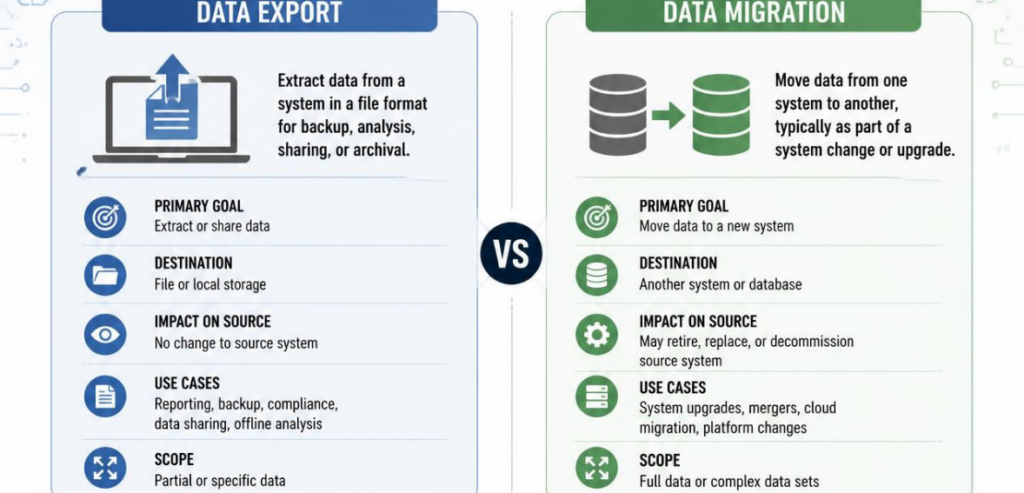
These two terms get blurred, and the difference costs money. An export is the raw file you pull from the old system. Migration is the work of mapping that file into the new one so it actually functions.
A good export includes everything: payment schedules, membership types, class history, and much more. A bad export only contains first name, last name, and email (if that). One gym owner in Phoenix learned this the hard way when he received a 40% renewal price hike. He requested his six years of data and received a bare CSV as a response. He then spent roughly $4,200 on staff hours and part-time help reconstructing the records he already owned. Vendor lock-in is effective when a system is designed in this manner.
Managed migrations generally range from free self-service to $200–$1,000. Complex integration requests may increase this cost significantly. Before signing any contracts, obtain a written estimate for the total cost of an export of your data. Not after you’ve spent a year rebuilding member history that was previously recorded.
Retraining Your Team: The Cost No One Quotes You
Every platform switch resets your staff’s muscle memory. The front desk that could book, bill, and check in a client in fifteen seconds now fumbles through unfamiliar menus. That slowdown is a real expense, even though it never shows up as a line item.
Training is usually separate from the cost you see on an invoice. In terms of time-to-proficiency metrics, studio-specific live training replaces costly mistakes during a go-live. Training platforms that offer links to videos and articles may appear to be a better value, but are ultimately costing your business more.
Expect deficits in output as your staff gets used to the new system. Many poorly managed migrations result in owners losing up to three months of potential revenue. Determine the total cost lost by multiplying your staff cost by the total hours lost.
Payment Processing Changes When You Switch

This is where an exit gets genuinely risky. Studio platforms usually bundle their own payment processing. When you leave, that processing relationship ends, and your recurring billing has to be rebuilt somewhere new. Do it sloppily, and memberships fail to charge, which means lost revenue and annoyed clients.
There are enough differences in the rates to change how you do your monthly math. Card-present and card-not-present transactions are priced differently, and a fraction of a percent becomes very significant on hundreds of memberships. Crunch the numbers based on how you do your monthly volume. Note below some sample calculations for some major providers.
Mindbody
Mindbody is the largest wellness marketplace for selling consumer services. Studios use Mindbody to help them enter a market and reach new consumers. For transactions that occur face-to-face, Mindbody Pay charges processing fees that average 2.75%. For card-not-present transactions, fees are 3.5% plus a $0.15 transaction fee. It also collects processing fees and an additional 20% processing charge on clients discovered via its Marketplace. When a studio closes its account, both the processing and the marketplace pipeline cease to exist.
WellnessLiving
WellnessLiving positions itself as the direct challenger and aggressively recruits Mindbody users with white-glove onboarding. It claims 20% to 40% lower credit card processing fees than Mindbody. That’s attractive on the way in. On the way out, watch the contract. Multiple reviewers report that cancellation is difficult, that contracts auto-renew without clear notice, and that fee increases can arrive without warning.
Glofox
Glofox builds an app that focuses on boutique studios and gyms with a strong brand. Published pricing is almost nonexistent. Price tiers, quarterly billing mandates, platform taxes, setup fees, and contract length are all hidden behind a sales call. According to reviews, Glofox continues to bill its clients after they cancel. For this reason, it is extremely important to verify how Glofox’s services are billed to you.
Vagaro
Vagaro is the flexibility option. It offers month-to-month contracts starting around $30 per month, with an added fee per instructor. Less lock-in on the front end usually means a less painful exit on the back end, which is precisely the point.
Contract Terms and Cancellation Fees
Contract length is the quiet lever vendors pull. Longer terms mean more lock-in, and premium platforms know it. Mindbody typically requires a 12-month commitment, and several reviewers report 24-month terms that create real switching friction. Glofox and WellnessLiving strongly push 12-month agreements for their mid-to-high tiers.
Auto-renewals trap you in a cycle. Once a contract automatically renews, you can easily miss the cancellation window. Note the cancellation period. Add your cancellation date to your calendar the day you sign your contract.
Since the fitness industry is estimated by the Health & Fitness Association to be close to $35 billion per year in the U.S., it makes sense that the big players in the industry go the extra mile to keep you. Bain & Company’s research states that an increase in customer retention by just 5 percent can lead to an increase in company profitability by 25 percent to 95 percent. High exit barriers are on purpose. They are part of the business model.
How Much Does Leaving Actually Cost?
Add it up honestly, and the picture sharpens. Direct costs include new platform fees, implementation, and any migration charges. Time costs include staff hours spent on migration, training, and reconciliation. Risk costs include billing errors and compliance exposure during the transition. Opportunity costs include the growth that stalls while everyone adjusts.
It costs a typical small studio around the low-to-mid thousands to migrate. Here’s the side of this equation vendors don’t normally focus on. It is usually more cost-effective to migrate than to stay on the same platform. Of course, migrating poorly costs more than either. The goal should never be to avoid a migration. It should be to approach a migration as a purchase decision as opposed to an emotional decision.
How to Protect Yourself Before You Sign
The best time to control exit costs is before you ever join. Treat this like a proper commercial investigation and get the full cost of ownership in writing.
Ask every vendor to confirm these six things on paper before you commit:
- The full monthly price for your tier and location count, with no vague “starting at” language.
- Every transaction, processing, and marketplace fee, quoted against your real membership volume.
- What your price does at renewal, including any automatic increases.
- The exact contract length, notice period, and cancellation terms.
- Whether a complete data export is included, and what it costs if not.
- Whether API documentation is public, so you know your data can actually move.
A company that’s sure of its prices has no problem with six out of six. If you’re still looking for criteria on evaluating these trade-offs, Software Advice has you covered with a nice vendor-neutral checklist on avoiding unnecessary switching costs.
Conclusion
Studio software exit costs are real, but they’re not mysterious. They cluster in three predictable places: getting your data out cleanly, retraining your team without bleeding productivity, and rebuilding payment processing without dropping memberships. Every one of these is manageable when you plan for it, and brutal when you don’t.
The lesson is to negotiate the exit before you sign the entrance. Ask the hard questions early. Get data portability, cancellation terms, and processing rates in writing. Weigh total cost of ownership, not the headline monthly fee. Do that, and you turn a stressful, expensive escape into a clean, planned move. Your data stays yours, your team stays productive, and your revenue keeps flowing the whole way through.
Frequently Asked Questions
How much does it cost to switch studio management software?
For a small studio, the realistic total usually falls between $3,000 and $15,000 once you include data migration, staff retraining, lost productivity, and any cancellation fees. The monthly subscription difference is the smallest part of that number.
Can my studio software vendor refuse to give me my data?
Most vendors have some kind of export feature, but the quality of the exports is all over the map. Some vendors offer an export that captures everything, including billing and attendance data. Some even just export the attendees’ names and emails. Make sure to get an answer in writing about what a full export includes, and choose a vendor whose API has publicly accessible documentation.
Will switching platforms disrupt my member billing?
It can, if it’s rushed. Payment processing is usually bundled with your platform, so leaving means rebuilding recurring billing on a new processor. Plan a parallel period, verify every membership imports correctly, and test billing before you fully cut over.
How do I avoid getting locked into a bad contract?
Read the contract length and auto-renewal terms before signing. Note the cancellation notice period on your calendar the day you commit. Prioritize month-to-month or short-term options if flexibility matters, and get every fee quoted against your actual transaction volume.